

Agent Skills: How to Teach Your AI Agent to Work by Your Standards
 May 4, 2026
  19 min read
 Most teams working with AI tools eventually hit the same problem: every developer interacts with the agent differently, and the output is unpredictable. Same task, same model - different results.
Rules partially solve this by setting constraints: "don't use this library," "follow this code style." But what happens when you need to not just constrain the agent, but teach it something new - hand it a process, give it access to scripts, templates, documentation, and have it pick all of that up automatically when the task calls for it?
That's what Agent Skills are for - an open standard already supported by Cursor, Claude Code, GitHub Copilot, and over 30 other AI agents. This article, based on one of our internal "Modern Development with Agentic AI" workshops, covers what Agent Skills are, how they work, and how to start using them
Where Rules Hit Their Limits
Rules are the first tool teams reach for when they want to standardize their AI workflows. And it makes sense: write an .mdc or AGENTS.md file, describe your rules - and the agent follows them. But the more you work with rules, the clearer their limitations become.
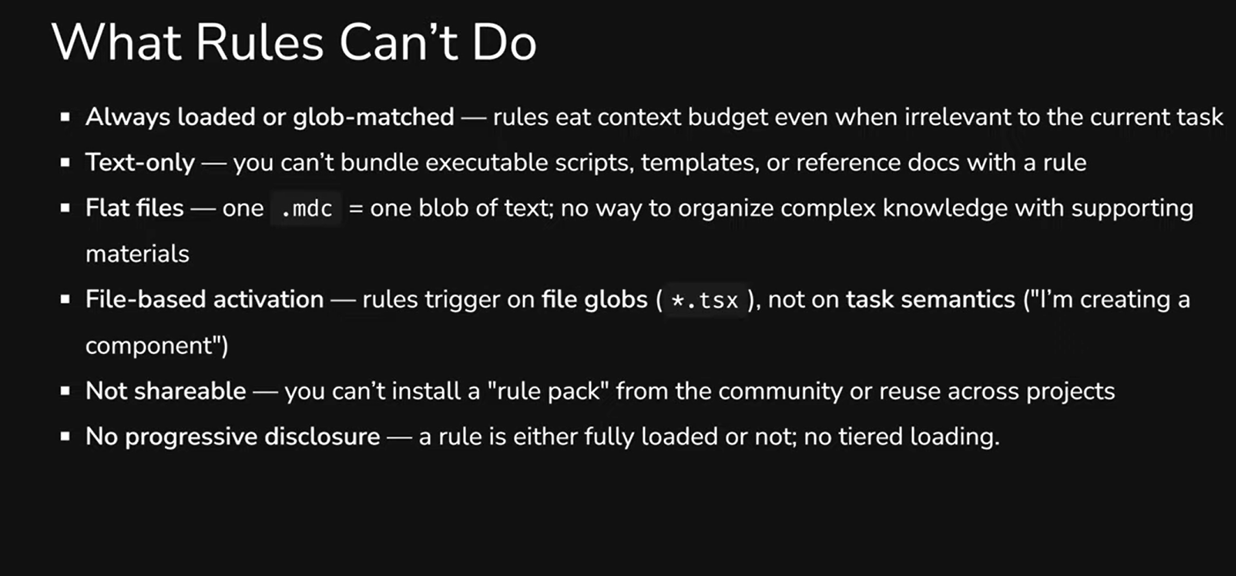
They're always in context. Every rule file eats into your token budget - even when it has nothing to do with the current task. If you have 15 rule files, all 15 end up in the context window every time.
Text only. You can't attach a script, template, or reference document to a rule file. One .mdc = one block of text, and that's it.
Triggered by files, not tasks. A rule activates when you're working with a certain file type (*.tsx), not when you're performing a certain task ("creating a component"). That's a fundamental difference: the same task can involve different file types.
Not portable. You can't install a "rule pack" from the community or transfer a set of rules between projects as a single module. Copy-paste is your only option.
No progressive disclosure. A rule is either fully loaded or not. There's no way to show the agent just the name and description first, then load the details when they're actually needed.
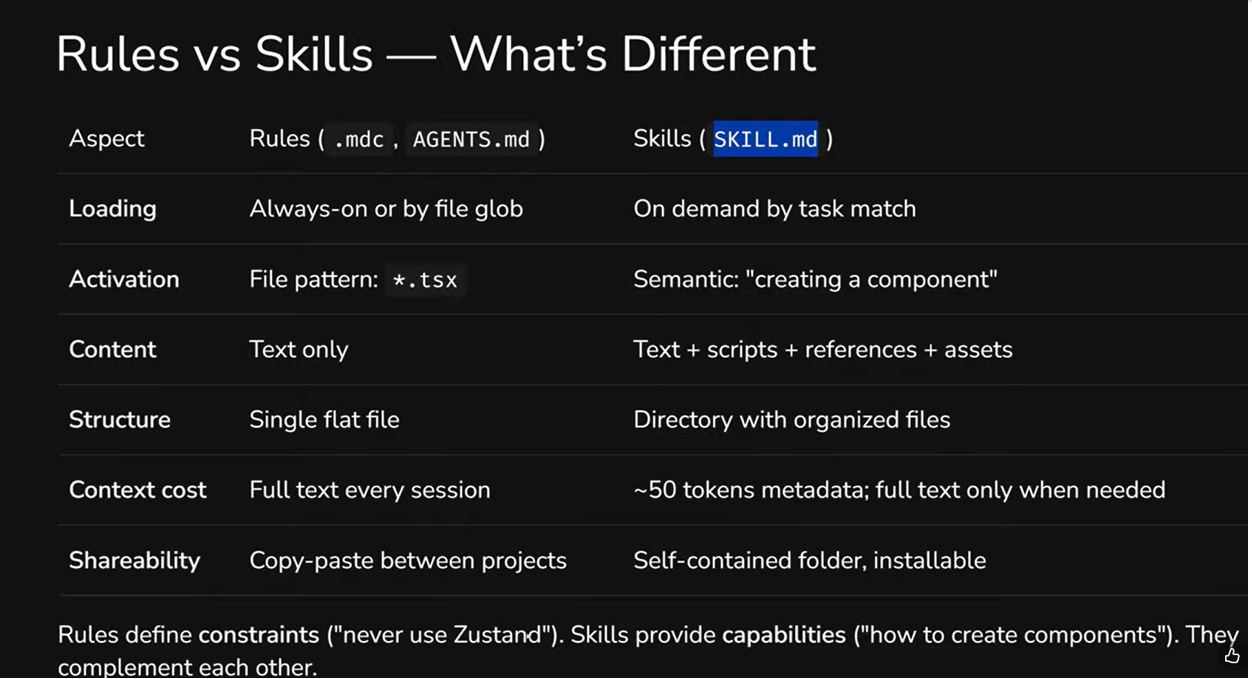
There's another key difference worth noting: context cost. A rule loads its full text every time. A skill loads ~50 tokens of metadata at startup, and the full text - only when the agent decides the skill is relevant to the task.
Agent Skills: What They Are and How They Work
Agent Skills are an open format for extending AI agent capabilities. In simple terms: a skill is a folder containing a SKILL.md file with instructions and metadata, plus (optionally) scripts, templates, and reference documents. The agent finds the right skill automatically when the task matches the description.
The standard was developed by Anthropic and published as an open specification at agentskills.io. But this isn't a closed single-vendor ecosystem - dozens of tools support the format.
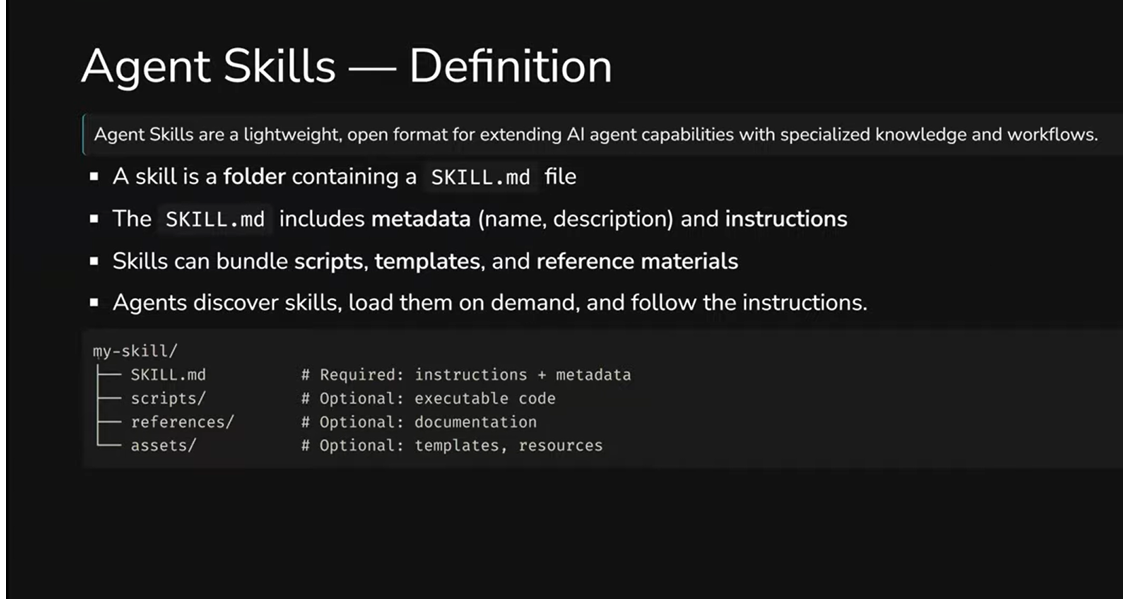
A skill's structure looks like this:
my-skill/
├── SKILL.md # required: instructions + metadata
├── scripts/ # optional: code the agent can execute
├── references/ # optional: documentation loaded on demand
└── assets/ # optional: templates, schemas, resources
The only required file is SKILL.md. Everything else is added as needed. A simple skill can be a single 30-line file, while a complex one might contain Python scripts, XML templates, and reference documentation.
Who Already Supports It
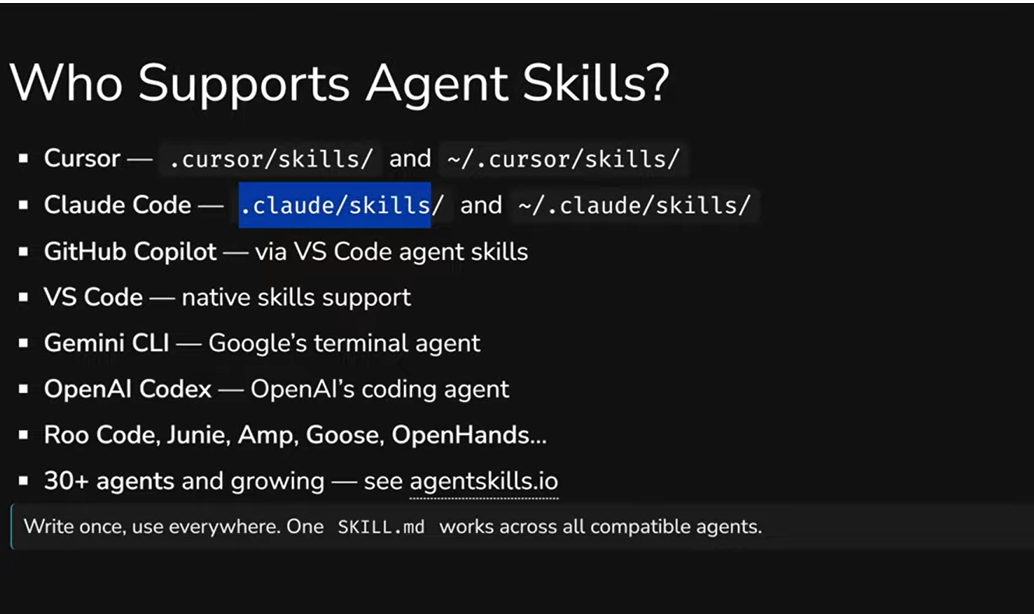
The list of agents supporting the Agent Skills standard is impressive: Cursor, Claude Code, GitHub Copilot, VS Code, Gemini CLI (Google), OpenAI Codex, Roo Code, Junie, Amp, Goose, OpenHands - and that's far from the complete list. At the time of writing, over 30 agents support the standard, and this number keeps growing.
The key principle: "write once, use everywhere." Each agent has its own native path for storing skills - for example, Cursor uses .cursor/skills/, Claude Code uses .claude/skills/. But there's already a standardized .agents/skills/ folder that all compatible agents understand. So a single SKILL.md works everywhere — you're not locked into any specific tool.
What This Means in Practice
For skill creators, it's the ability to describe a process once and use it across any agent. For teams and companies, it's a way to capture internal knowledge and processes in portable, version-controlled packages that can be shared across projects and people.
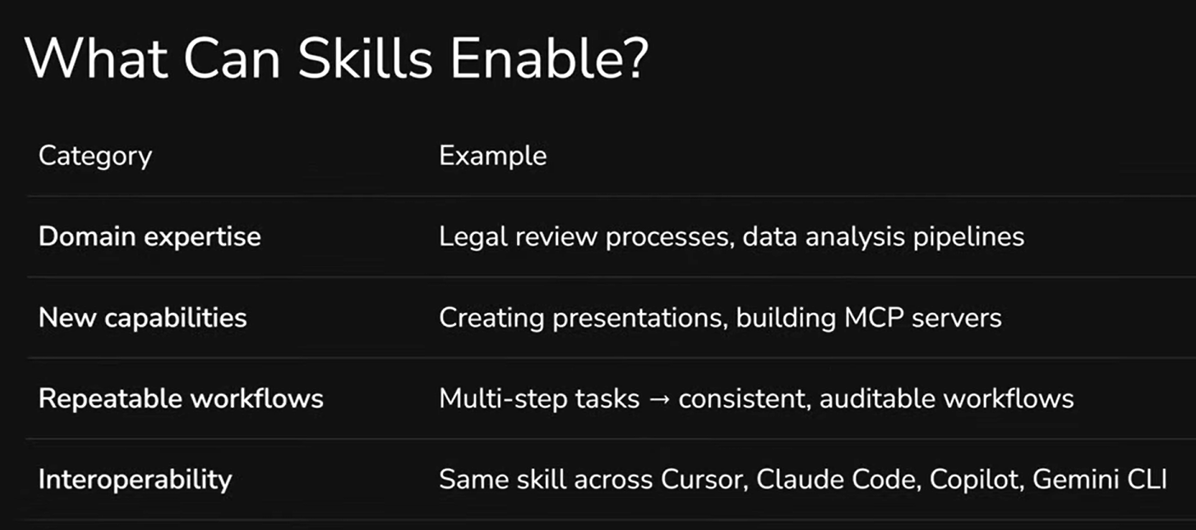
In practice, skills deliver four key things: domain expertise (e.g., code review processes or data analysis pipelines), new capabilities (creating presentations, building MCP servers), repeatable workflows (multi-step tasks become consistent, auditable processes), and the interoperability we've already mentioned - the same skill works in Cursor, Claude Code, Copilot, and Gemini CLI.
Two Examples: From Simple to Powerful
To understand what a skill looks like in practice, the best approach is to look at real examples. Anthropic publishes an official set of skills in an open GitHub repository - from algorithmic art to Word document creation.
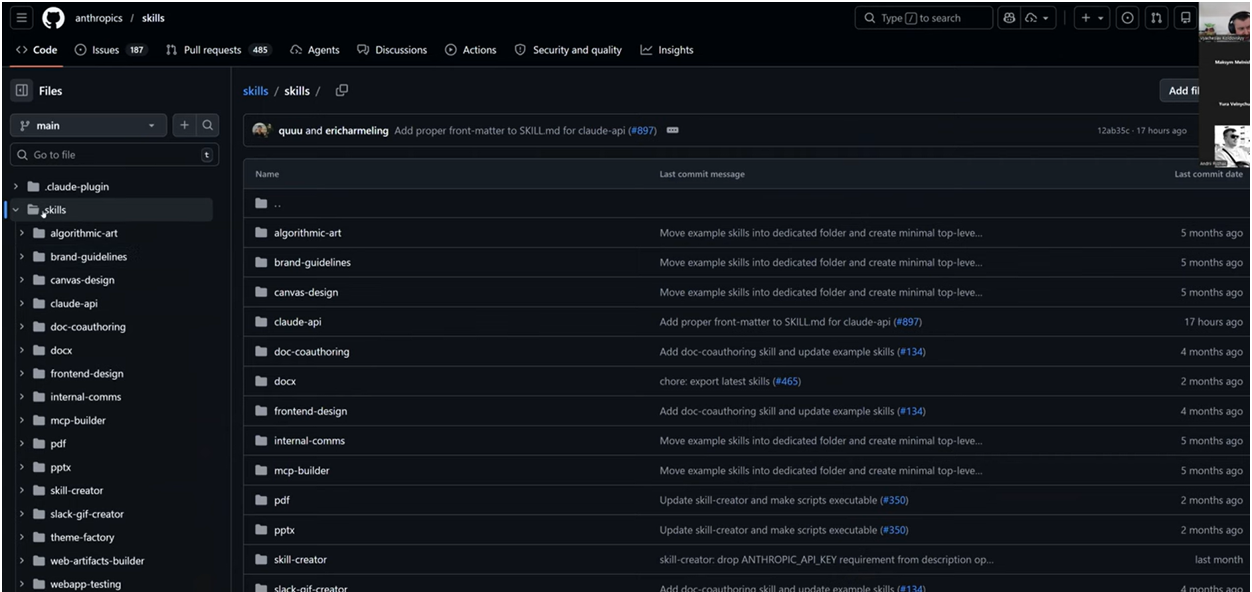
Simple skill: frontend-design
One of the simplest examples is a skill for creating frontend interfaces. It's a single SKILL.md file that's essentially a structured prompt.
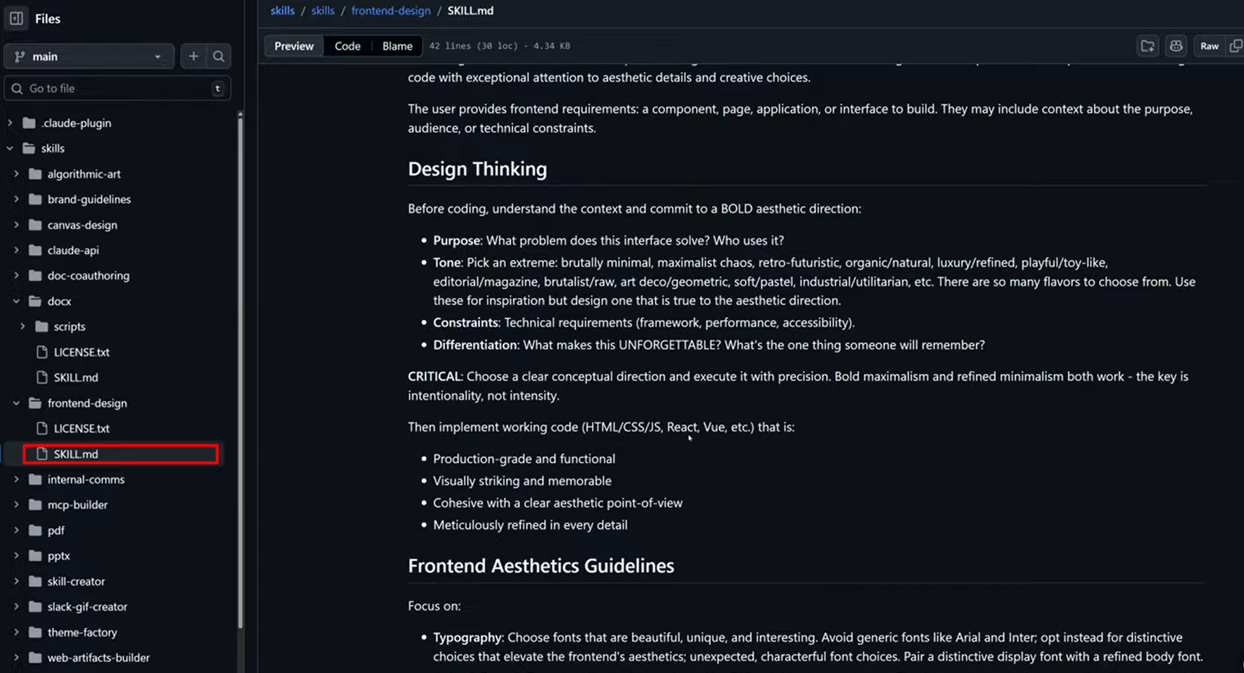
The file starts with metadata - name, description, license. Then comes the skill body, which describes the approach: first think through the aesthetic direction, define the purpose and tone, then implement the code. Separate guidelines cover typography, colors, and animations.
You could just paste this skill as a prompt into the chat. But the advantage of a skill is that it activates automatically when the task matches the description, doesn't consume context when not needed, and works the same way for everyone on the team.
Complex skill: creating .docx documents
Now - a completely different level. The skill for creating Word documents contains not just instructions, but Python scripts, XML templates, and validators.
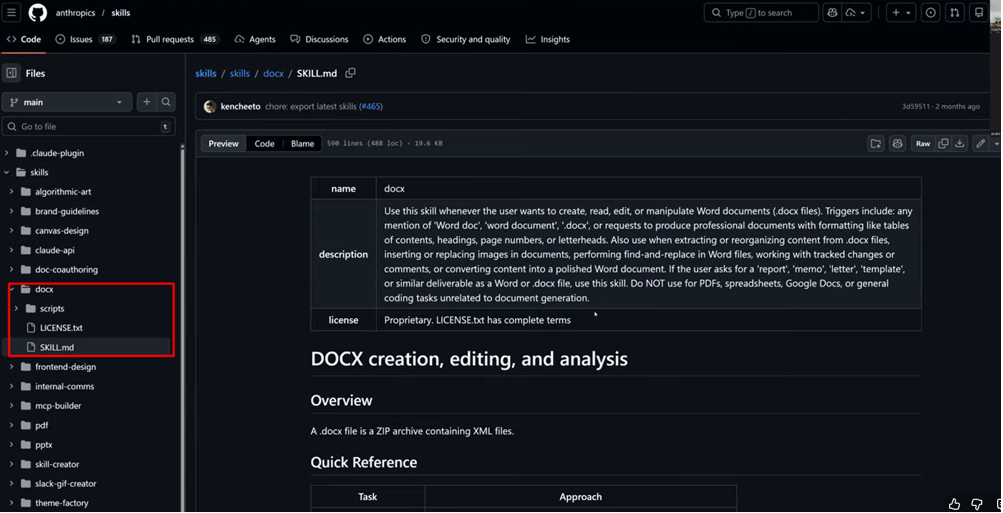
The structure is the same: a SKILL.md with description and instructions. But alongside it sits a scripts/ folder with dozens of files - Python code for format conversion, comment templates, document structure validators.
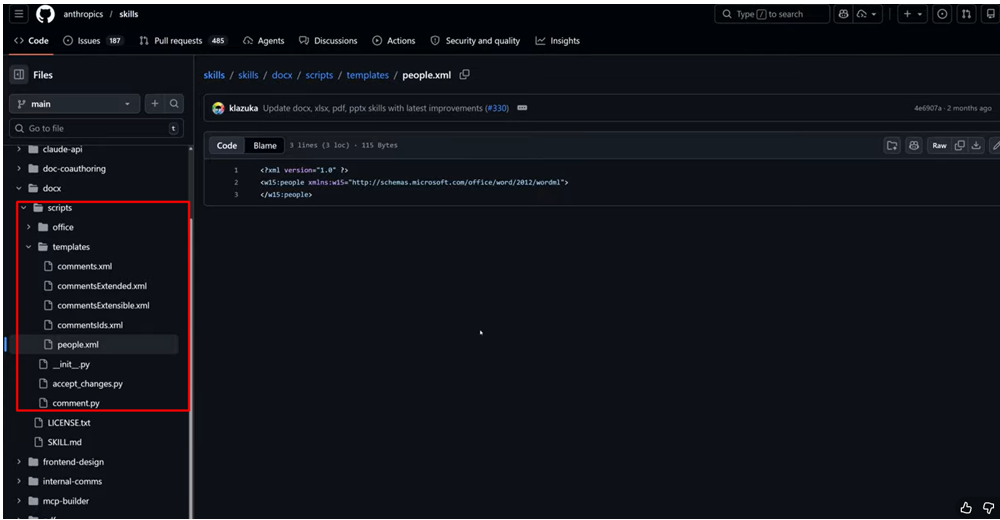
The key difference: the agent doesn't generate .docx files "from scratch" - it uses ready-made templates and runs deterministic code in a sandbox environment. The result is stable and predictable. A contract, an invoice, a report - everything is created at consistent quality, regardless of who on the team ran the task.
This is the main insight: a skill can contain executable code. It's not just a text instruction - it's a complete workflow with code, templates, and validation.
Third-party skills: tools are adding their own
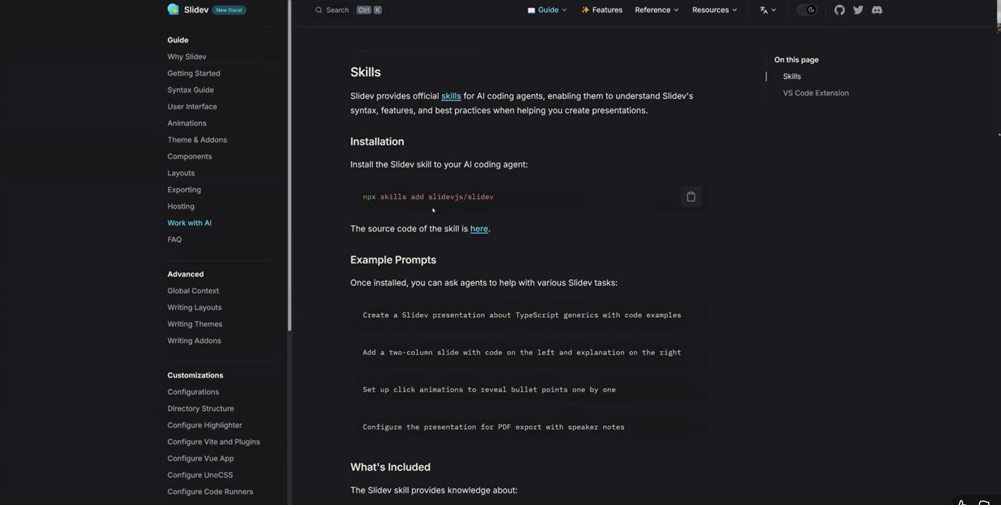
A separate interesting trend - tools have started releasing official skills for their own products. For example, Slidev (a framework for creating presentations in code) added an official skill that helps agents better generate slides with awareness of Slidev's syntax, features, and best practices.
How It Works Under the Hood: Progressive Disclosure
One of the main questions that comes up about skills: if there can be dozens of them - won't they clutter up the context window just like rules? The answer is no, and this is where one of the standard's most valuable features comes in.
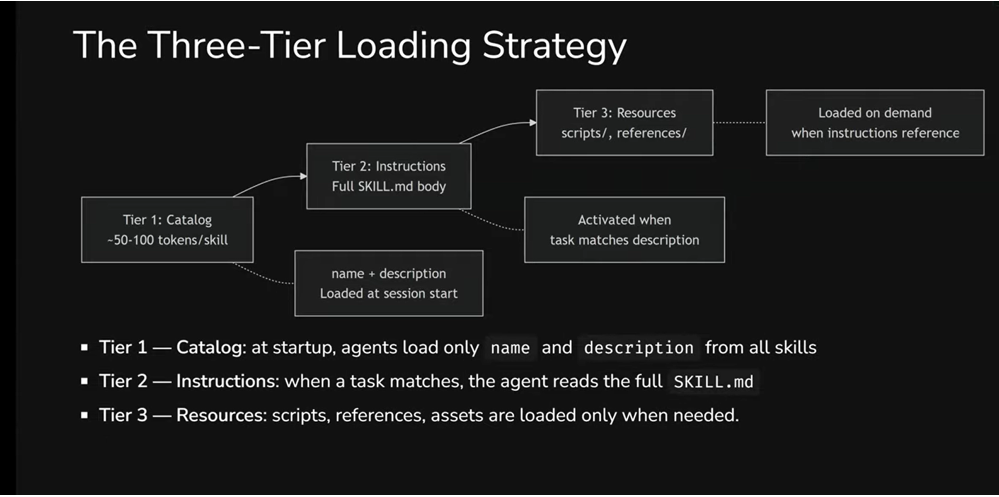
Skills use a three-tier loading strategy - Progressive Disclosure. Instead of loading everything at once, the agent works with skills in stages.
Tier 1 - Catalog. At the start of a session, the agent loads only metadata: the name and description of each skill. That's roughly 50–100 tokens per skill - minimal cost that lets the agent "know" about a skill's existence without loading it fully. Compare that with rules, where every file lands in the context in full, every time.
Tier 2 - Instructions. When the agent determines that a task matches a specific skill's description, it reads the full SKILL.md. This happens for only 1–2 relevant skills per session, not all of them at once. The recommended body size is under 5,000 tokens.
Tier 3 - Resources. Scripts, reference documents, and templates are loaded only when instructions in SKILL.md explicitly reference them. Resources can be large -even megabytes - and that's not a problem, because they don't necessarily enter the context window. The agent can simply copy a template or run a script without "reading" it.
Why This Matters for Productivity
The context window is a shared resource. Your skill competes for space with conversation history, the system prompt, and other skills. Progressive disclosure solves this: out of 20 installed skills, full instructions are loaded for only 1–2 that are relevant to the current task. Scripts and reference documents load only when instructions explicitly reference them. The rest - just a name and description that cost almost nothing.
Token Budget by Tier
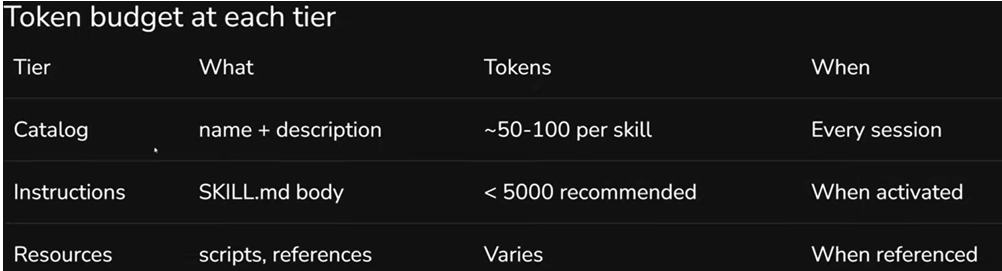
Here's the full picture:
- Catalog (Tier 1): ~50–100 tokens per skill. Always loaded at the start of each session.
- Instructions (Tier 2): up to 5,000 tokens (recommended). Loaded only when the agent activates the skill.
- Resources (Tier 3): variable size - can be megabytes. Loaded only when instructions reference them.
In practice, this means: 20 skills "cost" only 1,000–2,000 tokens of permanent budget. Compare that with rules, where every file lands in the context in full, every time, regardless of the task.
The result: the agent stays fast and precise while having access to deep expertise on demand.
Anatomy of a Skill: What It's Made Of and How to Write One
Now - to the specifics. How exactly is a skill built, and what to pay attention to when creating your own.
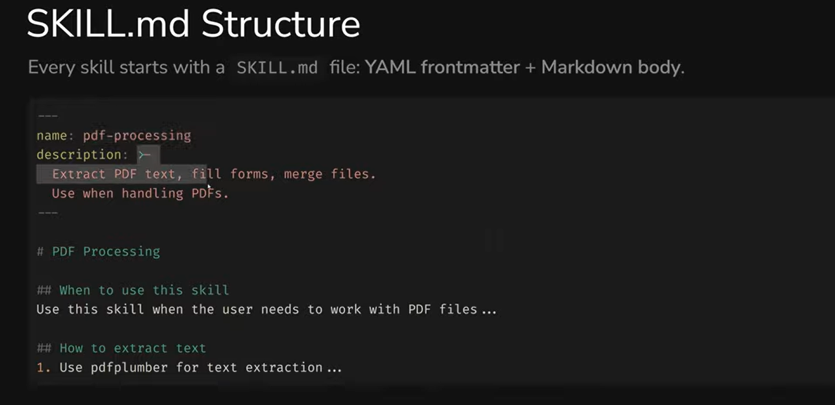
SKILL.md Structure
Every skill starts with a SKILL.md file consisting of two parts: YAML frontmatter (metadata) and Markdown body (instructions).
Required Fields
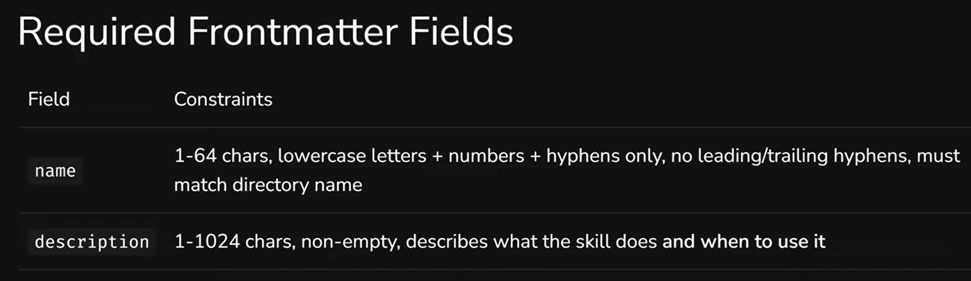
Two fields without which the skill won't work:
name - 1 to 64 characters. Lowercase letters, numbers, and hyphens only. Can't start or end with a hyphen, no consecutive hyphens allowed. The name must match the skill's folder name.
description - 1 to 1,024 characters. This is the key field for discovery: it's what the agent uses to decide whether this skill is needed for the current task.
Writing Descriptions That Work
A bad description is a real problem. Too vague - and the skill won't activate when needed. Too broad - and it'll activate when it shouldn't.
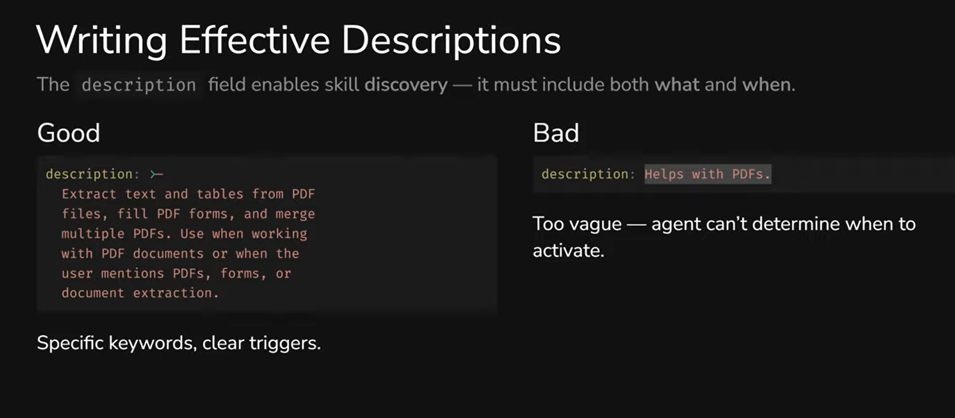
Compare: "Helps with PDFs" - the agent has no idea when to apply this. Versus "Extract text and tables from PDF files, fill PDF forms, and merge multiple PDFs. Use when working with PDF documents or when the user mentions PDFs, forms, or document extraction" - here it's clear: what the skill does and when to use it.
Three practical tips: use specific keywords (extract, generate, validate, review), describe activation conditions ("Use when...", "Triggers on..."), and name the concrete actions the skill performs.
Optional Fields
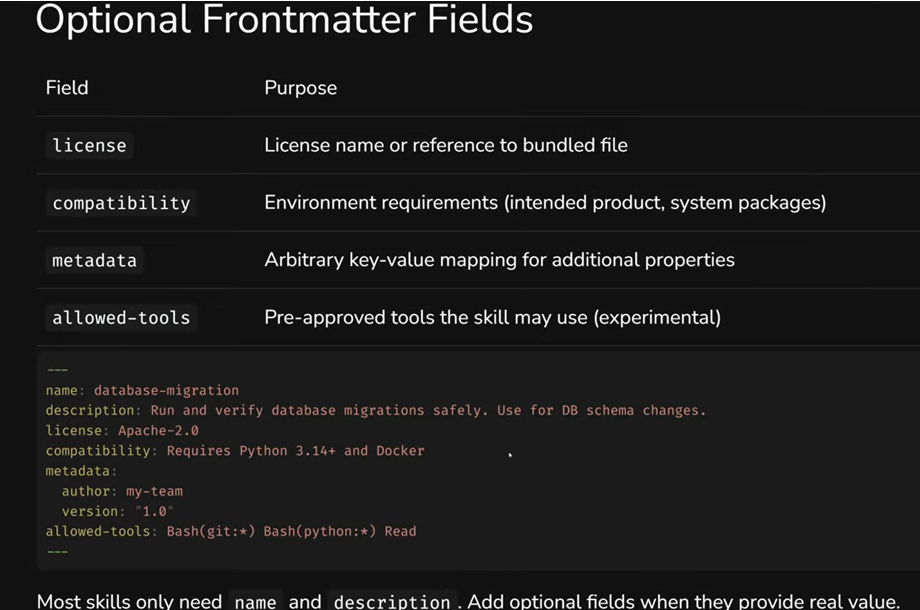
Most skills only need name and description. But when needed, you can add: license, compatibility (environment requirements - e.g., Python 3.14+ and Docker), metadata (author, version), and allowed-tools (restricting which tools the skill can use - for example, blocking internet access).
Body: Free-Form Instructions
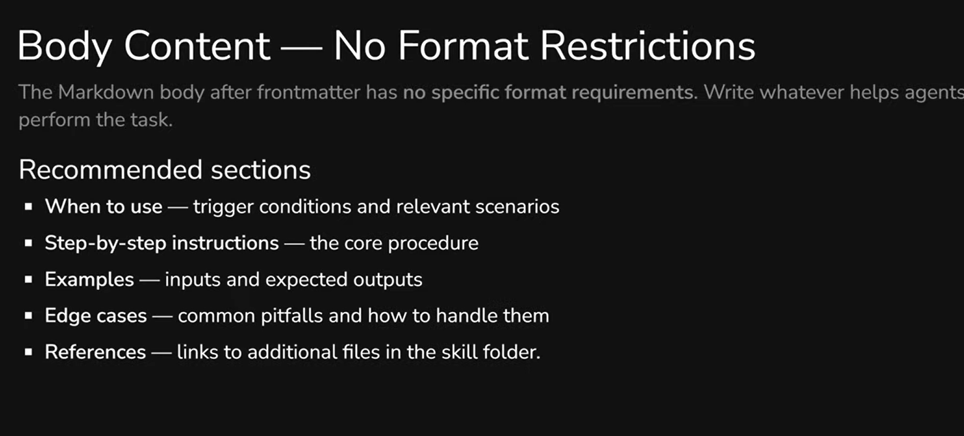
The skill body after the metadata is essentially a pre-prompt in free format. No rigid structural requirements - write whatever helps the agent perform the task. But there's an important nuance: the agent might determine from the metadata that it needs the skill, then after reading the instructions, decide otherwise - and opt out. So it's useful to clarify activation conditions at the beginning of the body: when is this skill actually appropriate.
After that - step-by-step instructions, examples with expected results, common pitfalls, and links to additional files. But all of this is optional, not mandatory.
The core principle is conciseness. The context window is a shared resource, and every token in your SKILL.md competes with conversation history and other skills. Recommendation: keep SKILL.md under 500 lines. If it's longer - move details to separate files. Vercel's approach is a good example here: a short cataloging SKILL.md, with all the depth in dozens of separate reference files that load only on demand.
Skill Creator: Don't Write From Scratch
A useful detail: both Anthropic and Cursor have a built-in Skill Creator - a skill that helps create other skills. In practice, this means you don't need to write SKILL.md from zero. Activate the creator, describe what you need, and get a ready-made skill that you then customize. This is the recommended approach.
Skill Directory: Beyond SKILL.md
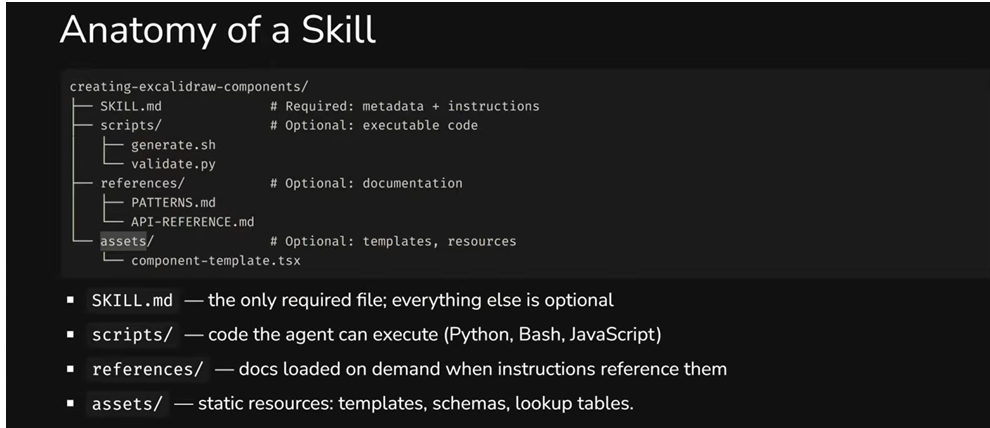
SKILL.md is the only required file. But around it, you can build a full working environment. The folder name must match the skill name - if it doesn't, the validator will flag that the skill doesn't meet the standard. Subfolder names, however, are arbitrary, though there are conventions worth following.
scripts/ - executable code that the agent runs as-is, without modifications. This can be Python, Bash, JavaScript - anything. But there's an important detail: the script must output results to the console. If an error occurs silently, the agent won't understand what went wrong and may continue working with incorrect data.
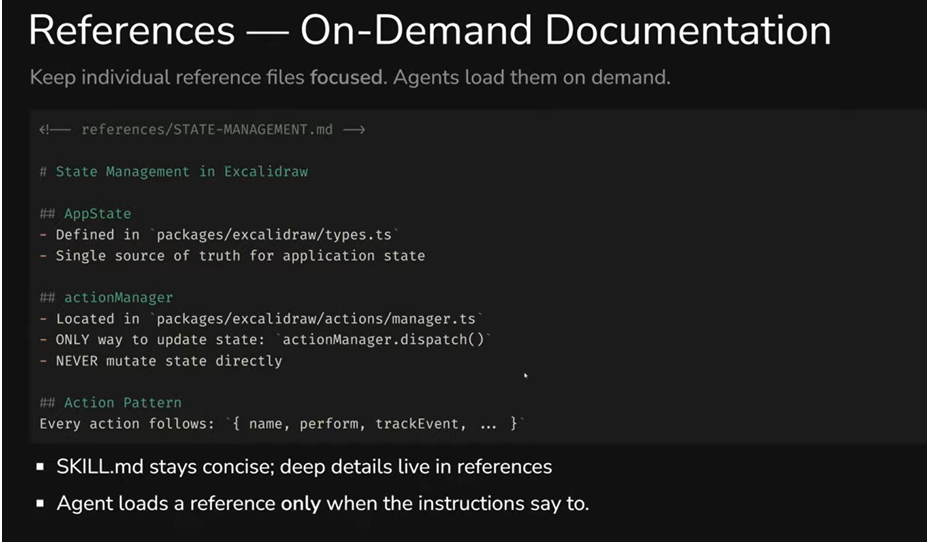
references/ - documentation on demand. The idea is simple: you don't overload SKILL.md with details, but move deep context into separate files. The agent loads a reference only when it reaches a step where it's needed. The files themselves can be large - that's not a problem, since they don't enter the context automatically.
assets/ - static resources: templates, schemas, lookup tables. The agent can copy them or use them as a foundation without "reading" them.
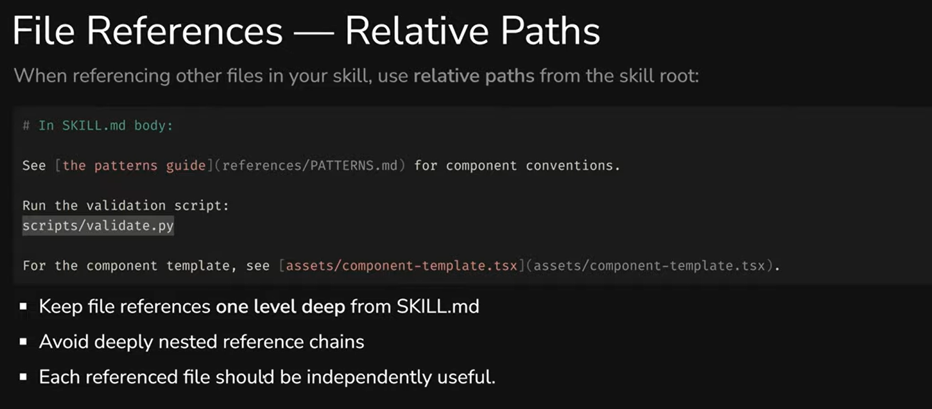
When referencing files from SKILL.md, use relative paths: scripts/validate.py, references/PATTERNS.md. And avoid chains where one reference leads to another, which leads to a third - each file should be self-contained and useful on its own.
Negative and Positive Prompts: A Non-Obvious Technique
A separate technique worth highlighting is the approach to writing examples in skills (and beyond). In many high-quality skills, code or behavior is described in pairs: first "incorrect," then "correct."
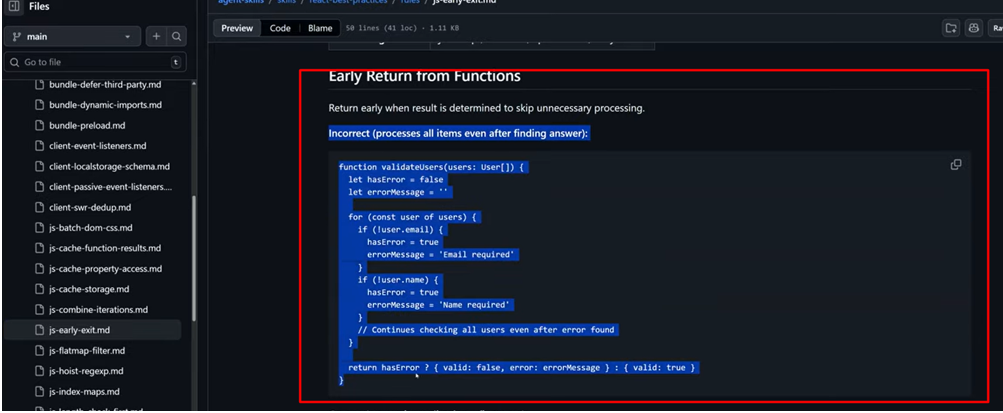
Incorrect example
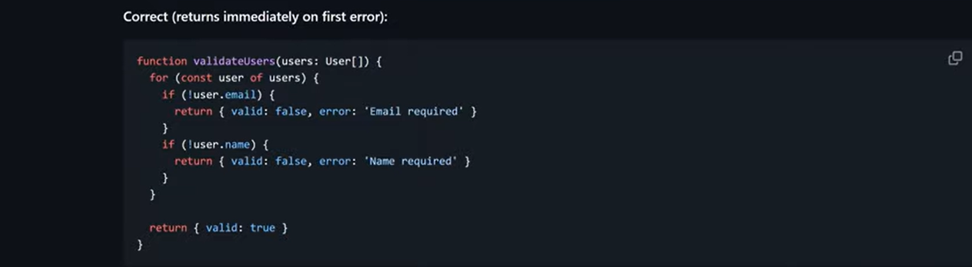
Correct Example
For example, Vercel's react-best-practices includes a reference file about early returns from functions. First, it shows the incorrect version: the function checks all users even after finding an error - wasted work, wasted resources. Then - the correct version: the function returns immediately upon hitting the first error.
Why this particular order? Previously, negative prompts weren't recommended at all - LLMs could treat the "bad" example as a pattern to follow. But modern models have significantly improved instruction following, and the "Incorrect first, then Correct" approach already works well. The key is to never provide only a negative prompt without a positive alternative. Otherwise, the model may not understand what's actually expected.
Where to Find Skills and Where to Put Them
Community Skills and Security
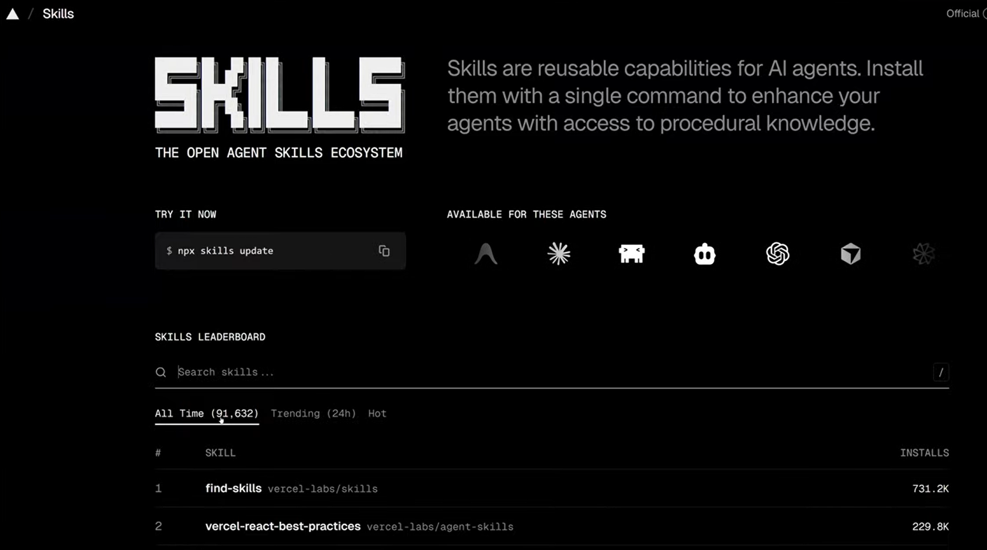
Today's main resource for finding ready-made skills is skills.sh. It's an open ecosystem with over 90,000 skills, a leaderboard, search, and filters. You can find skills for code review, testing, working with specific frameworks - practically any task.
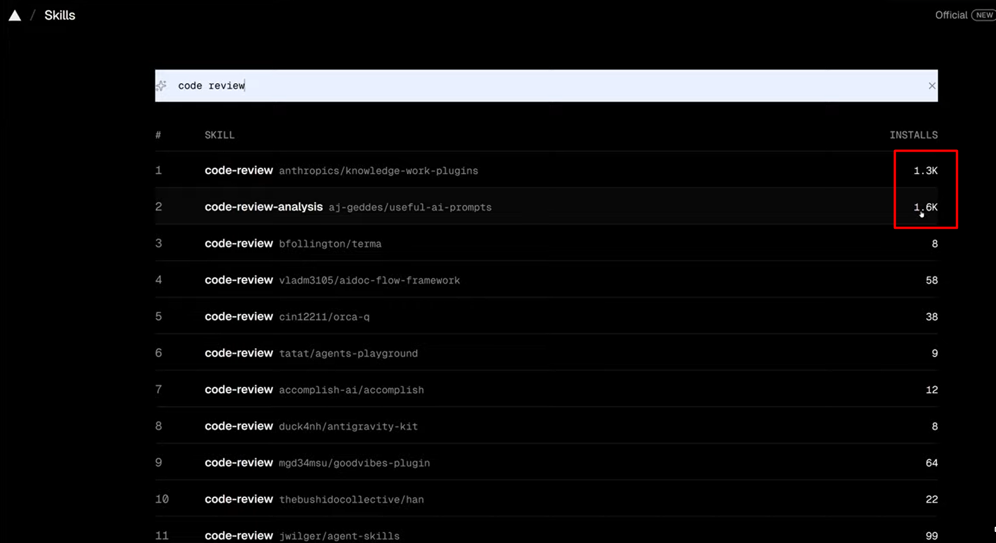
Pay attention to the number of installs and - more importantly - security audits. Verified skills from well-known authors (Anthropic, Vercel, CodeRabbit) carry PASS marks from independent auditors.
How to Install
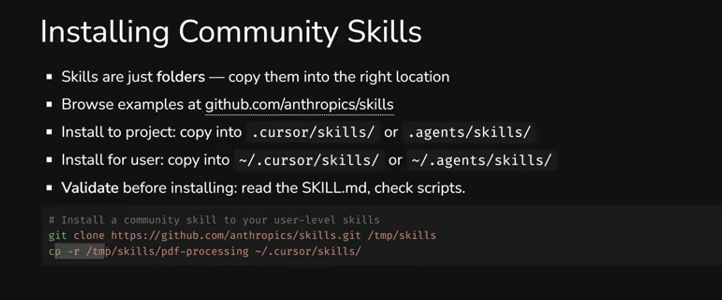
Skills are just folders. You can install them in several ways: via npx skills add with a link to a repository, via git clone followed by copying the desired folder, or simply by copying the folder manually. The mechanism lets you pull a skill from any repository - you don't have to publish on skills.sh.
But be careful: skills can contain executable code, which means potentially malicious code. There have already been enough such cases. Always review the SKILL.md and scripts before installing. Better yet - regenerate the skill yourself using Skill Creator. That way you'll know exactly what's being executed.
Project-Level vs User-Level
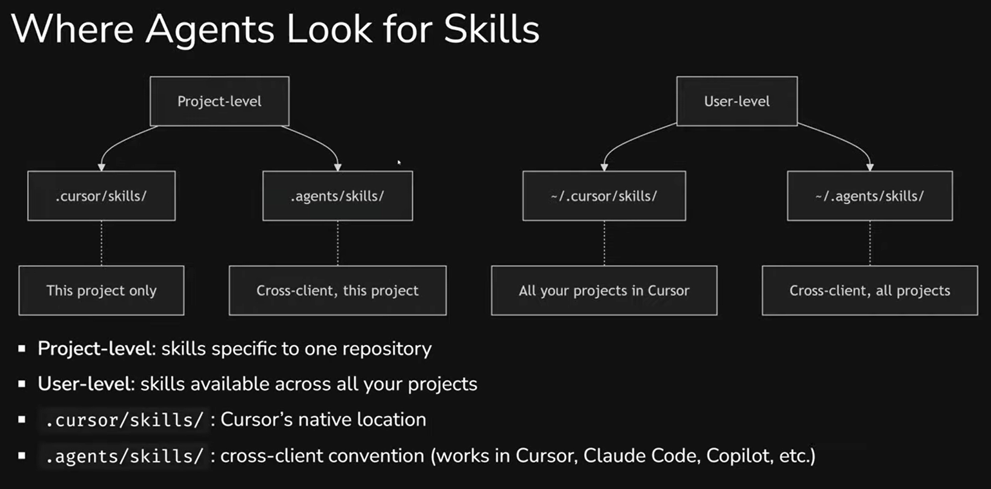
Skills can be stored at two levels: in a project (available to everyone working with that repository) or at the user level (available to you in any project).
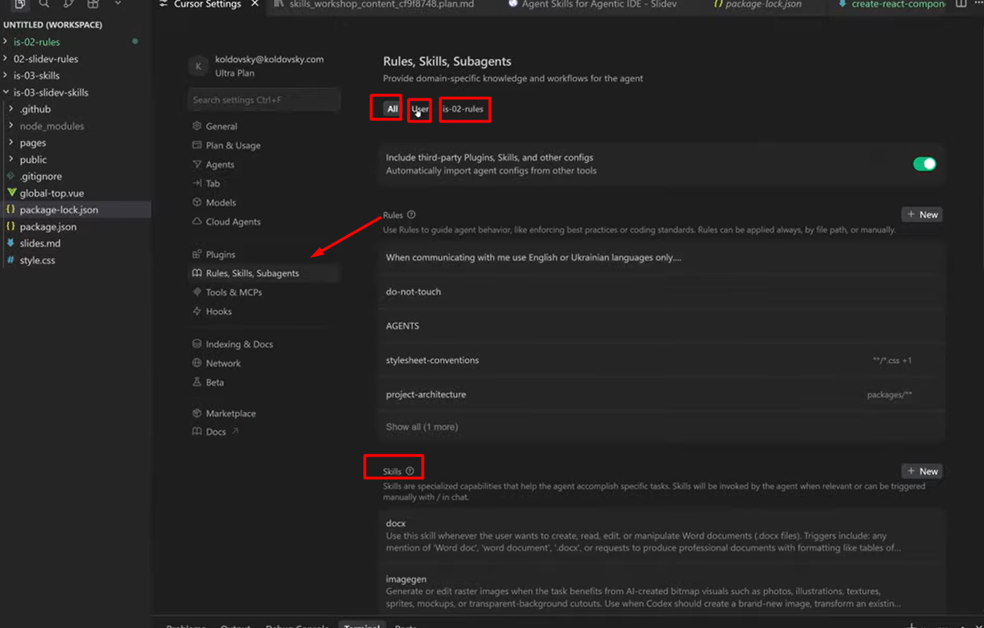
In Cursor, this is clearly visible in settings: the "All" tab shows all skills, "User" shows global ones (docx, imagegen, find-skills, and others), and the project tab shows only project-level skills. User-level skills are pulled in automatically in any project when the agent decides they're needed.
For team collaboration, there's an important nuance. If a skill for creating components is only on your machine - only your agent will generate them correctly. The rest of the team will work without that knowledge, and you won't even know about it until you notice differences in results. So for anything project-related - keep skills in the repository.
Skills + Rules + Commands: The Complete Picture
We've mentioned several times that skills don't replace rules. Now - a full comparison of all three tools, including commands.
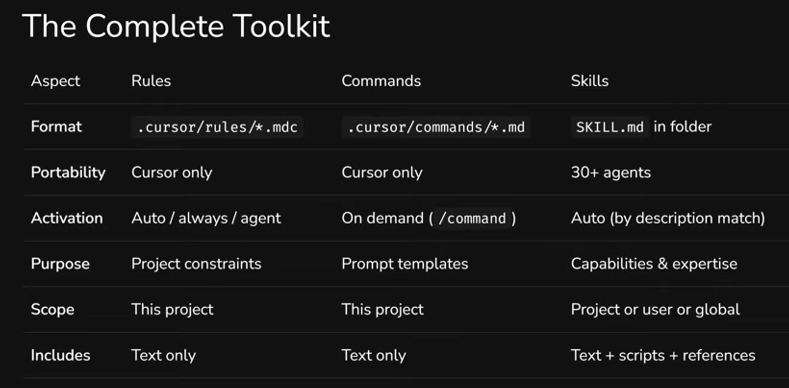
In short: rules are constraints, commands are triggers (actions on demand), skills are capabilities (expertise on demand). Different format, different activation, different purpose. But they work together.
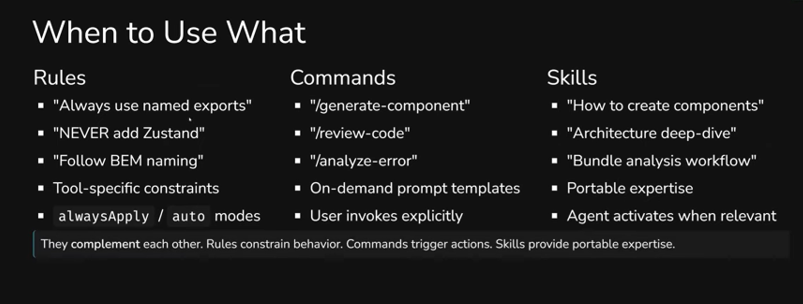
More specifically: a rule is "always use named exports," "never add Zustand." Short, categorical, works automatically or by file type. A command is a prompt you activate manually: /generate-component, /review-code. Essentially - an action template. A skill is "how to create components in this project," "how to do code review by our standards." It activates automatically when the task matches the description and can contain scripts, templates, and documentation.
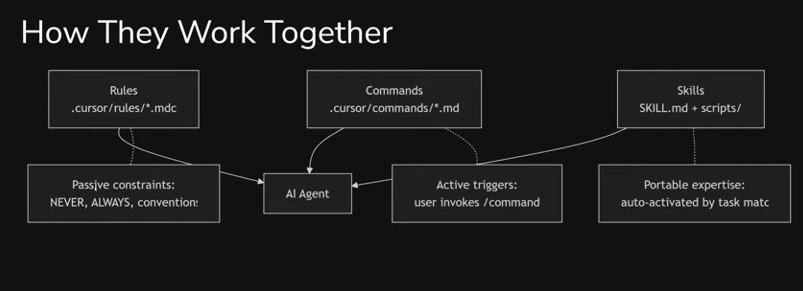
How this works together in practice: imagine a developer asks the agent to create a new component. The skill "creating-excalidraw-components" activates automatically (because the task matches the description) and provides step-by-step instructions - how exactly to build a component in this project. In parallel, the rule "conventions.mdc" constrains: named exports, functional components, specific conventions. And the command /generate-component Button lets you launch the entire workflow with a single command. Each tool handles its own part - and the output is a predictable result, regardless of who on the team executed the task.
Best Practices: Writing Skills That Actually Work
Conciseness Above All
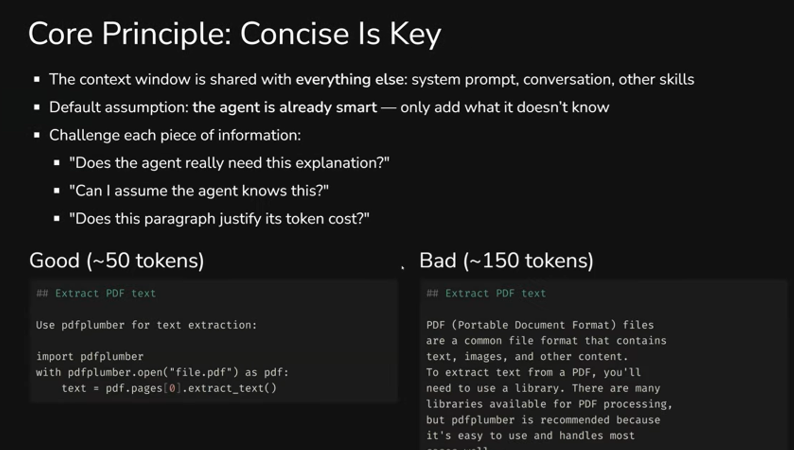
The core principle: the agent is already smart. Don't explain what a PDF is or how Python works - only add what it doesn't know. Every unnecessary paragraph is tokens competing with the actual task context.
Compare two approaches to the same instruction. Compact (~50 tokens): "Use pdfplumber for text extraction" and three lines of code. Verbose (~150 tokens): a paragraph about what PDFs are, why a library is needed, which libraries exist, and why pdfplumber is recommended. Same result, but three times the cost.
Degrees of Freedom
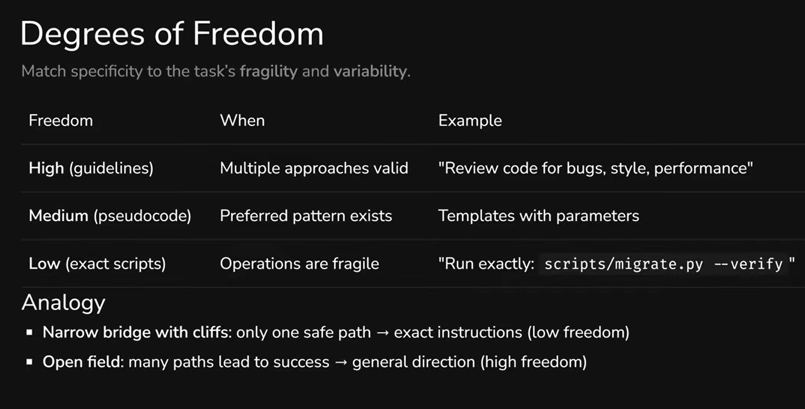
Not all skills need to be equally detailed - and that's fine. The question is how deterministic the result needs to be.
If a task allows multiple correct solutions (e.g., code review) - general guidelines are enough. The agent will decide how to proceed. If there's a preferred pattern with variations (e.g., generating components from a template) - describe pseudocode with parameters, leaving the agent room to adapt. And if an operation must be executed exactly, with no deviations (e.g., database migration) - provide a specific script for the agent to run as-is.
Naming
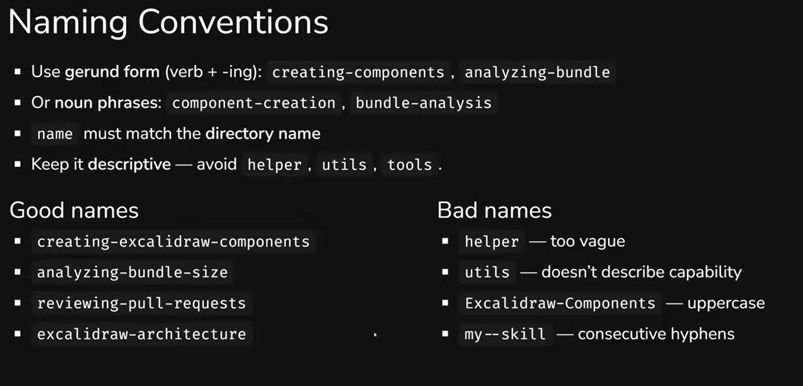
Name skills using gerund form: creating-components, analyzing-bundle, reviewing-pull-requests. Or noun phrases: component-creation, bundle-analysis. The key is that the name should describe a capability, not be abstract. helper, utils, tools - bad names, because they say nothing about what the skill can do.
Anti-Patterns
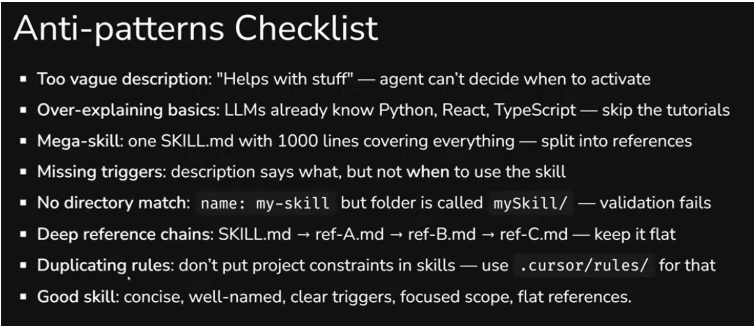
A quick rundown of the most common mistakes: overly vague descriptions ("Helps with stuff"), explaining basics (LLMs already know Python), one mega-skill at 1,000 lines instead of several focused ones, descriptions without trigger conditions (no "when to activate"), folder name not matching name, deep reference chains, and duplicating rules in skills - if something is meant to be a constraint, keep it in rules.
Summary
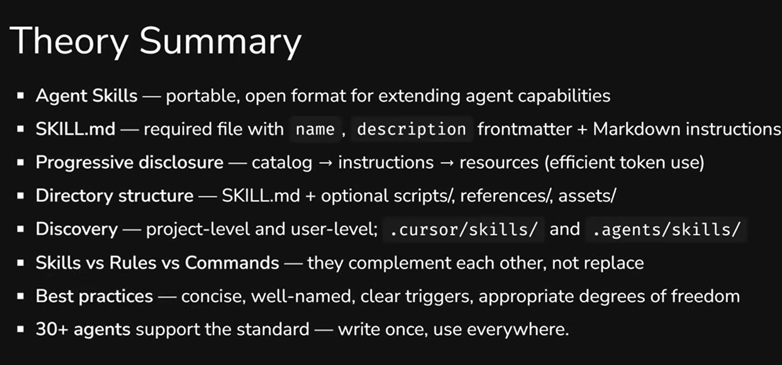
If you're already working with AI agents and using rules - you're on the right track. But rules solve only part of the problem: they set constraints but don't transfer knowledge. Agent Skills close exactly this gap.
The standard is no longer experimental. Over 30 agents support it, the ecosystem on skills.sh includes tens of thousands of ready-made skills, and major projects (Vercel, Slidev, CodeRabbit) already publish official skills for their tools. This isn't something that "will be useful someday" - it works now.
For a team, adoption can be straightforward: start with one skill for a task your developers perform frequently and inconsistently. See if the results become more consistent. If so - scale up. Skill Creator will help you avoid writing everything from scratch.
This article was prepared based on materials from an internal InventorSoft workshop in the "Modern Development with Agentic AI" series.

Related articles

Top 10 Education Software Development Companies in 2026
Mar 16, 2026 18 min read 
How AI Tools Are Transforming Development at Inventorsoft
Nov 7, 2024 1 min read 
Outsourcing vs Outstaffing: What’s the Difference and Which Should You Choose?
Jun 2, 2022 10 min read - Where Rules Hit Their Limits
- Agent Skills: What They Are and How They Work
- Two Examples: From Simple to Powerful
- How It Works Under the Hood: Progressive Disclosure
- Anatomy of a Skill: What It's Made Of and How to Write One
- Negative and Positive Prompts: A Non-Obvious Technique
- Where to Find Skills and Where to Put Them
- Skills + Rules + Commands: The Complete Picture
- Best Practices: Writing Skills That Actually Work
- Summary